
For the team
Set up a team host, then let the code answer
Today a question about the code means finding the engineer who knows it. After one afternoon here, it goes to a Slack channel instead. Nine steps, done once, by one person — each ends in a check you can see, so a stall always has a known step.
One computer that stays awakeOne Slack workspaceThe repositories, already clonedOutbound connections only
- 01
Pick a computer that stays awake
A shared computer in the office, a spare box, a Mac mini on a shelf — somewhere nobody writes features. Team runs check out branches and run commands, and that goes best on a computer nobody is typing on.
- Apple Silicon, macOS 13.0 or later
- Set to stay awake on power, signed in, and left running
- The repositories cloned on it as ordinary local git checkouts
Check: The computer stays awake on power, and the person who will operate it can sit at it.
- 02
Install PRCHD
Download the DMG, drag PRCHD into Applications, and launch it. It is a menubar app, and this computer is the whole deployment: there is no server to provision and no inbound port to open.
- Open the DMG and drag PRCHD into Applications before first launch
- Launch it and accept the normal first-open confirmation
- Closing the popover leaves the host running — only Quit stops it
Check: A PRCHD beacon sits in the menubar and the dashboard opens from it.
- 03
Attach the repositories
Attaching points at a local git directory. The host detects the stack — Node, Rust, Go, Flutter, Python, Ruby, and common monorepo layouts — and seeds setup, run, and test commands you can edit.
- Choose each repository directory already on this computer
- Confirm the default base branch for each project
- Review the detected setup, run, test, build, and lint commands
Check: Every project the team will ask about is listed, with its detected commands beside it.
- 04
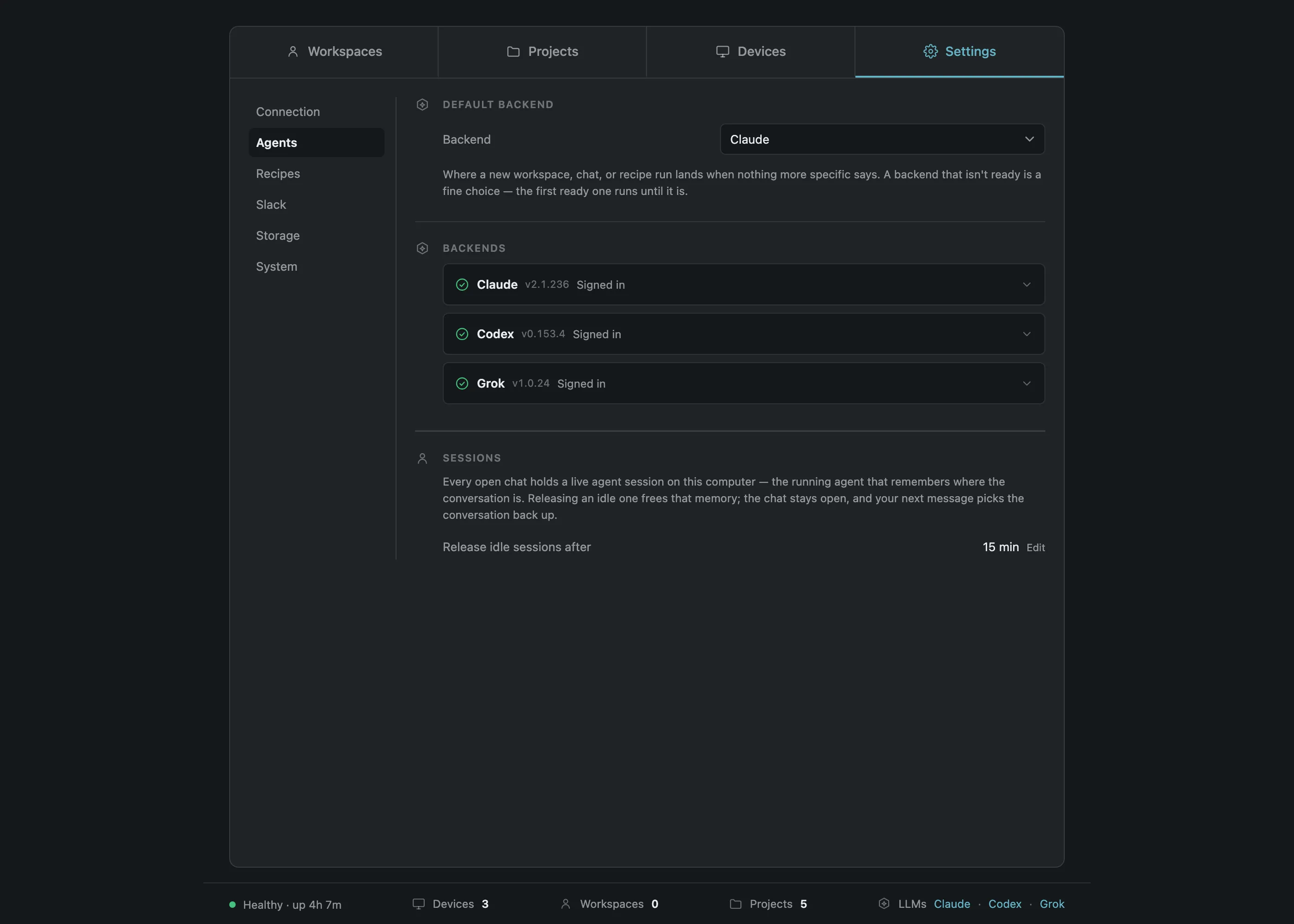
Sign the agent CLIs in
Claude Code, Codex, or Grok, signed in with the team’s own accounts. Each CLI keeps its own sign-in: PRCHD drives the CLIs, never receives or stores an agent credential, and resells no model access.
- Sign in through each agent’s own CLI in Terminal on this computer
- Refresh the Agents area to re-read backend status
- Set the default backend, model, and reasoning effort
Check: At least one backend reads ready. The others read needs login or not installed, with guidance beside them.
- 05
Connect Slack
The team installs PRCHD’s published manifest as its own custom Slack app, then pastes two tokens into the dashboard. The connection is Socket Mode: one outbound WebSocket, so nothing on this computer listens.
- Create the app from the published manifest in your Slack workspace
- Copy the app-level token and the bot token
- Paste both into the dashboard and connect
Worth telling whoever approves Slack apps. The Slack app is the team’s own custom app, created from a published manifest. Socket Mode apps can’t be listed in the Slack Marketplace, so this is a paste-two-tokens install rather than a one-click one. It is the same choice that keeps the connection outbound: the app lives in your Slack workspace, and this computer stays unreachable from the internet.
Check: The Slack workspace reads connected in the dashboard, and the bot appears in that Slack workspace.
- 06
Bind channels to projects
#payments speaks for the payments repository. Each binding carries two switches you set deliberately: whether the channel may run recipes, and whether its activity is visible to paired phones at all.
- Invite the bot to the channel, then bind that channel to one project
- Decide whether the channel may run, or may only ask
- Decide whether its activity reaches paired phones at all
- A project answers in exactly one Slack workspace, or none. Adding it to a second is refused by name.
- A channel speaks for exactly one project, and only for a project already added to that Slack workspace.
- A public channel can never be runs-enabled. A private channel later made public loses its run permission automatically.
- Channels shared with another organization are refused, because membership leaves the org.
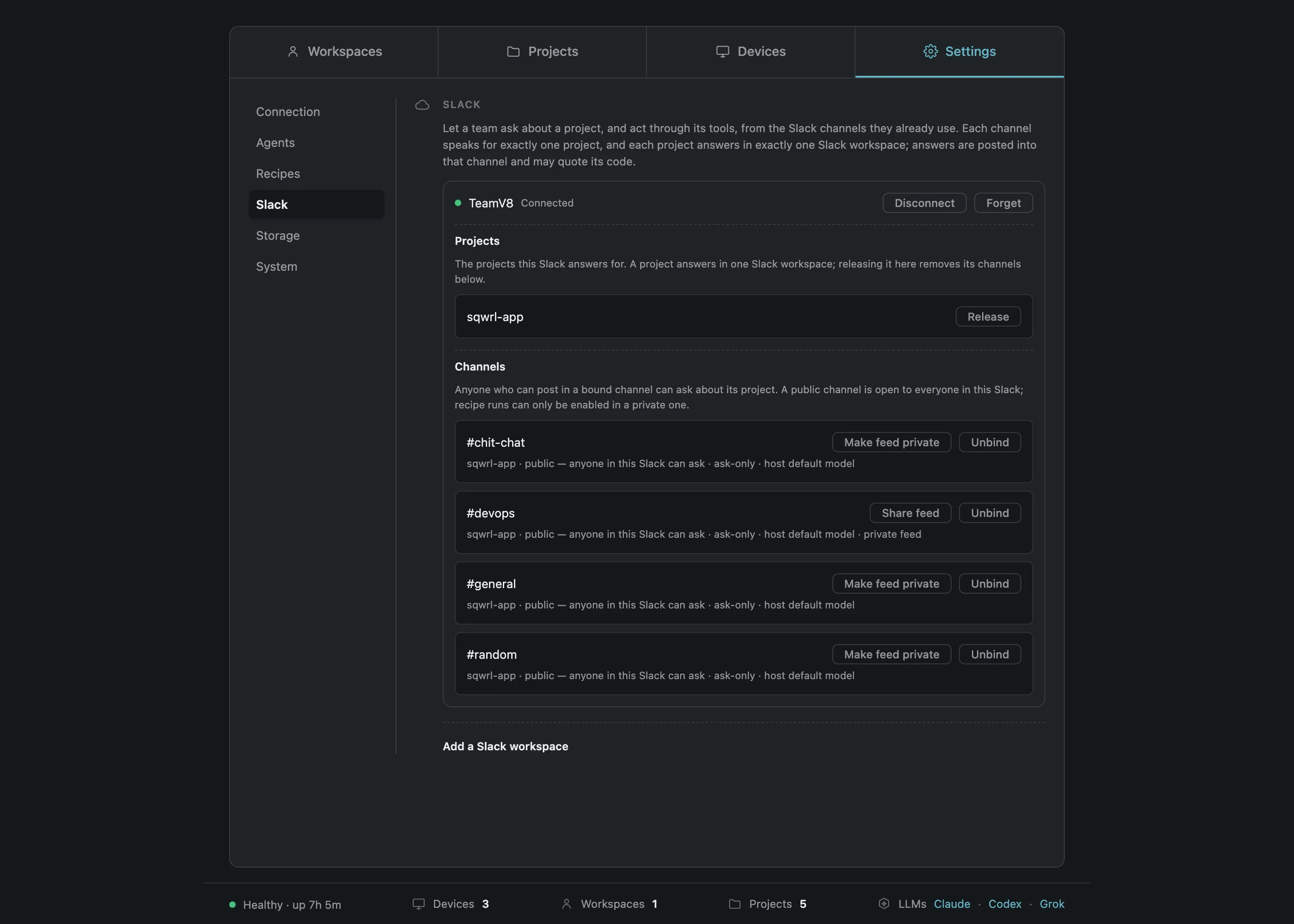
Check: Mentioning the bot in the bound channel returns an answer footed with the project and commit it read.
- 07
Attach the team’s tools via MCP
The tracker, the crash reporter, the warehouse, the docs system — so a question that needs one of them comes back answered. Each is configured on the agent CLI, per project root, exactly the way that CLI already documents. PRCHD has no MCP client of its own: the agent holds the credentials and talks to those services, and PRCHD runs the agent. That is why any MCP server that exists today already works here.
- Configure each server on the agent CLI, in the project root
- Leave the credentials where that CLI already keeps them
- Enable the built-in browser and Slack servers per project if you want them
Check: A question that needs the tracker comes back with the record, not with a refusal.
- 08
Write the recipes, then schedule and trigger them
A recipe is a stored prompt with a posture. Write the ones the team will reuse, then put the recurring ones on a cron line and the event-driven ones behind a trigger URL.
- Write the prompt and fix its posture — Plan, Act, or Work
- Put recurring ones on a cron line, in this computer’s timezone
- Give an event-driven one a trigger URL and a verifier you wrote
A trigger fires a recipe you wrote, under that recipe’s posture; the prompt, the mode, and the target all come from the recipe. A new trigger’s URL is live immediately and answers every delivery as ignored until its verifier exists — the first real delivery is the test.
Check: A recipe run from a private channel announces itself and threads its result.
- 09
A team host has no paired phones
That is a design choice. A team host answers in Slack, so its results arrive in the thread the work was asked in, and it sends no push. A developer who wants the phone runs their own host on their own computer, which is also where hands-on coding happens.
- Leave the team host unpaired — its device list stays empty
- Mark a binding private to keep its activity on this computer entirely
- Point developers at the personal setup guide for their own computers
Check: The team host lists no paired devices, and team traffic stays out of everyone’s personal feed.
For everyone else, this thread is the product
It is what step 06 checks, and it is all the rest of the team needs to see. The footer names the project, the commit, the branch, and the mode the answer was read under, so nobody has to ask how current it is.
@PRCHD which service owns the refund webhook?
eyes · PRCHD
Working on it…
payments-api owns it. The endpoint is mounted in app/webhooks/refunds_controller.rb and the signature check runs in the Rack middleware before routing.
Everyone else is already set up
The operator does the nine steps above. Everyone else is ready the moment they are in a bound channel.
- Their own Slack account
- The Slack app they already use
- Nothing to install or pair
- Channel membership, not a repository credential
- A mention and a question
Limits you can quote
Worth knowing before you write the first trigger, and specific enough to answer whoever asks what happens under load.
Slack
- Answer length
- Split at paragraph boundaries, up to 4 messages, then a notice
- Outbound pacing
- About 1 message per second per channel, from a durable outbox with backoff
- Missed mentions
- Mentions from the last 15 minutes are answered; older ones get a “missed” reply
Triggers and schedules
- Verifier timeout
- 2 seconds, in its own process, per delivery
- Verifier variables
- Up to 24 short scalars, interpolated into the prompt as words
- Webhook body
- Up to 64 KB after shaping — refused, never truncated
- Queue depth
- 200 pending or running per trigger, then saturated
- Stale delivery
- Expires at 3 hours, before it starts rather than mid-run
- Dead letters
- Replayable by hand for 7 days; rejection diagnostics kept 1 day, body-free
- Cron
- Standard five fields, this computer’s timezone, minute granularity
Per project
- Environment values
- 64 per scope, 8 KB per value, write-only and Keychain-sealed
- Trigger concurrency
- Separate limits for worktree runs and project-root runs, set per computer
Where it stops
Each of these is a deliberate edge, stated up front. Knowing them before the first channel is bound makes them easy to plan around.
- The Slack app is yours
Installed into your Slack workspace from a published manifest. Socket Mode apps can’t be listed in the Slack Marketplace, so setup is paste-two-tokens rather than one-click.
- Slack is the identity model
Membership of a bound channel is the whole grant, with the same reach for every member. If your compliance story needs per-person roles inside the tool, this is not that tool.
- A trigger runs a stored recipe
The recipe you bound to it, under that recipe’s posture. A trigger can’t name its own prompt, mode, or target, and that limit is the point.
- The first real delivery is the test
A trigger has no test button. Its URL is live immediately and answers every delivery as ignored until its verifier exists.
- Slack is words, not widgets
A mention and one slash command are the whole vocabulary. There are no buttons, modals, home tab, or message shortcuts.
- macOS on Apple Silicon
The host runs there today. There is no Windows, Linux, or Intel build yet.
It catches up after every reconnect
Replies queue in a durable outbox and drain even while the socket is down. Mentions posted while the computer was offline are read back on reconnect from a per-channel cursor. Every reconnect re-reads each binding against Slack’s own answer, so a permission granted on Monday lasts only as long as the condition it was granted under. Every interaction lands in an append-only log as a content-free record naming the Slack workspace, the channel, and who asked.
From here on, a question about the code goes to the channel, and the answer comes back with the commit it was read from. For most of the team, that channel is the whole product.
Setting one up for yourself instead? The personal setup guide pairs a phone to your own computer. Stuck on a step? hello@prchd.app.