
Overnight suite
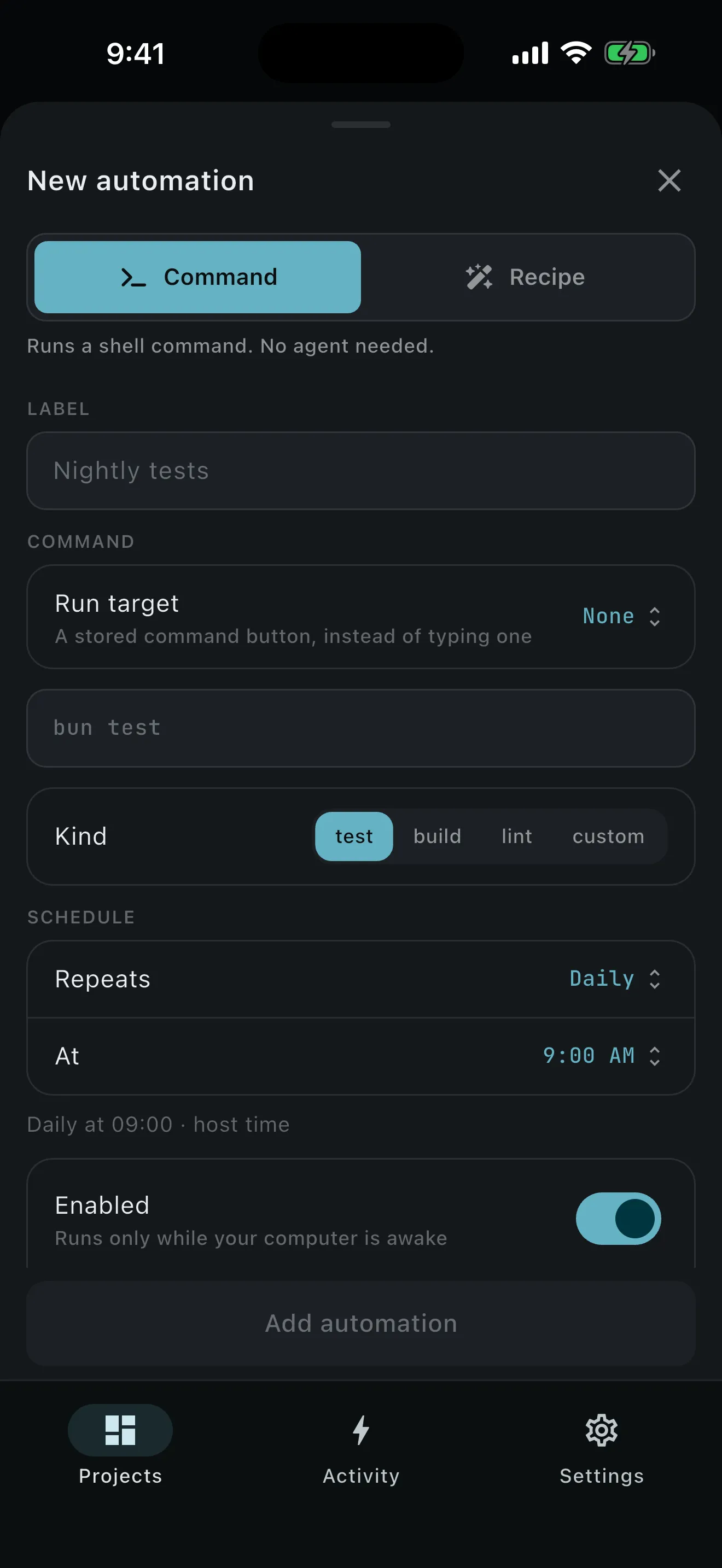
Runs the full test suite on the latest base and writes up what broke, with the change that most likely did it.
- kind: workspace
- mode: Work
- deliverable: worktree
What ships today
Know where it stops before you install it. Every capability sits beside what it depends on, and every limit carries the same weight as a feature.
For the developer
An agent needs you for a minute at a time — a question, the diff, the tests, the merge. A personal host brings that minute to your phone: one computer, one phone, your own tailnet, and the agent still working in the real checkout.
Pair once by QR or a typed code, then manage each device from the computer or the phone.
A project is one local git repository on one computer, attached where it already lives.
Each piece of work owns its own worktree, branch, snapshotted base, processes, and git state, so parallel work stays apart.
preparingThe setup script is runningactiveNormal work and reviewneeds attentionSetup failed; inspect or retryneeds mergeClose hit a conflict; worktree preservedclosedMerged or explicitly discarded; history readableClaude Code, Codex, and Grok share one set of controls — model, reasoning effort, and mode — sourced from whichever backend you pick.
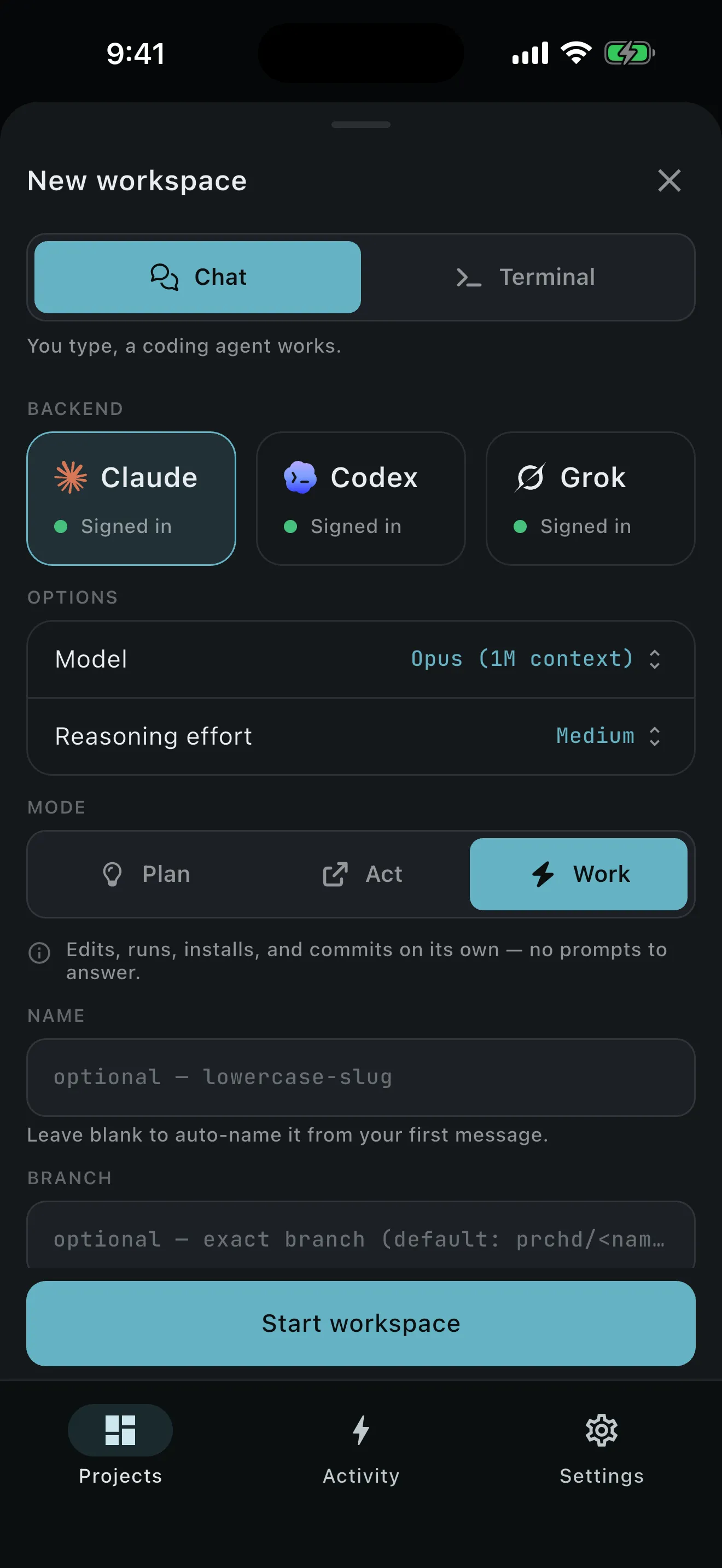
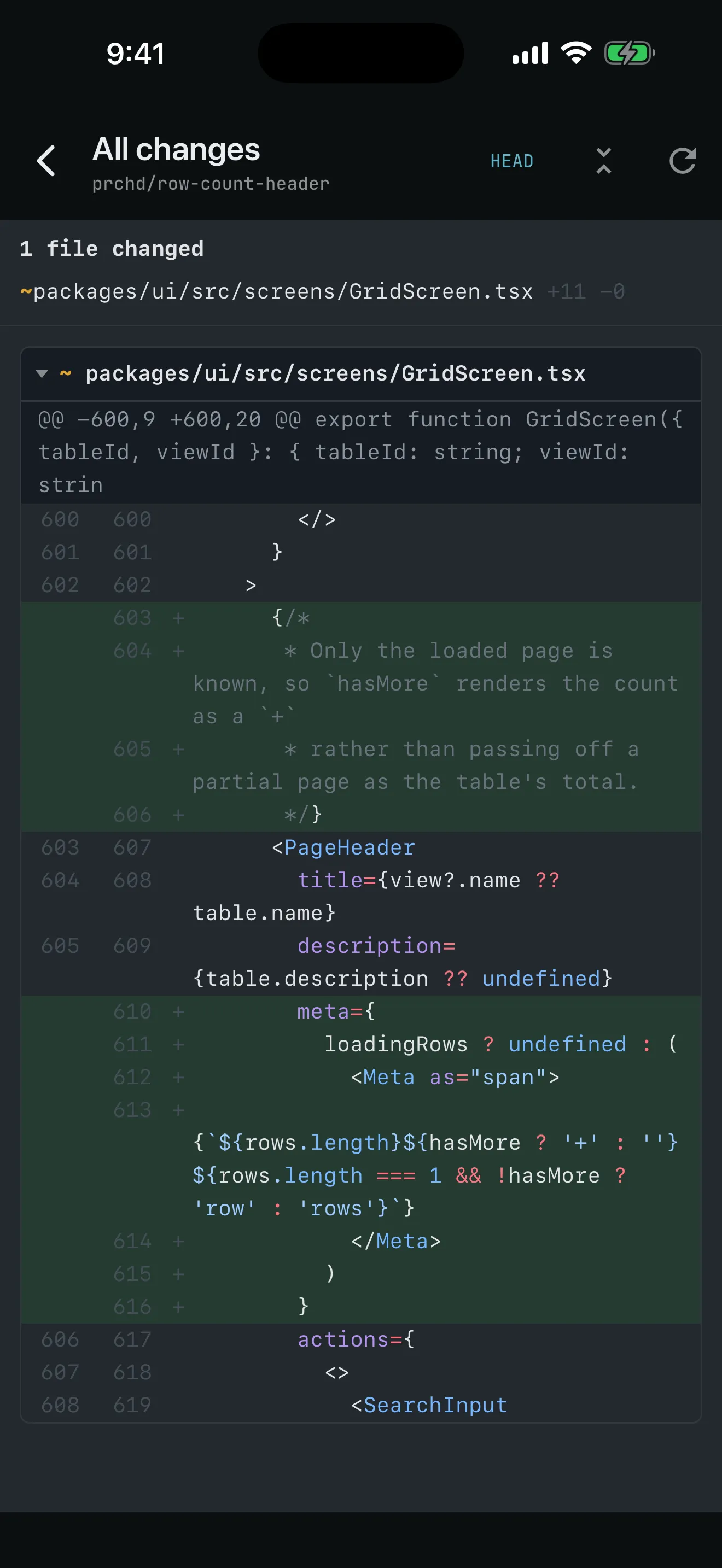
You review the real thing: your computer renders live file and diff views from the workspace being changed.
Know it works before it lands. Commands, tracked processes, and interactive terminals stay attached to the workspace.
Land the work from wherever you are. Local git is built in; issues, pull requests, and PR review need a GitHub remote and the gh CLI signed in on your computer.
Know when you’re needed without watching for it. Activity separates what needs you, what is running, and what happened recently.
For the team
Questions only the code can answer used to mean interrupting an engineer. A team host answers them in Slack: one computer the team owns, one Slack workspace per project, and membership of a bound channel as the whole grant. The operator sets it up once; everyone else just asks.
The team’s own custom Slack app, installed from a published manifest, connected outbound from the machine.
A binding points one channel at one project. Two switches decide what that room can do and who sees the traffic.
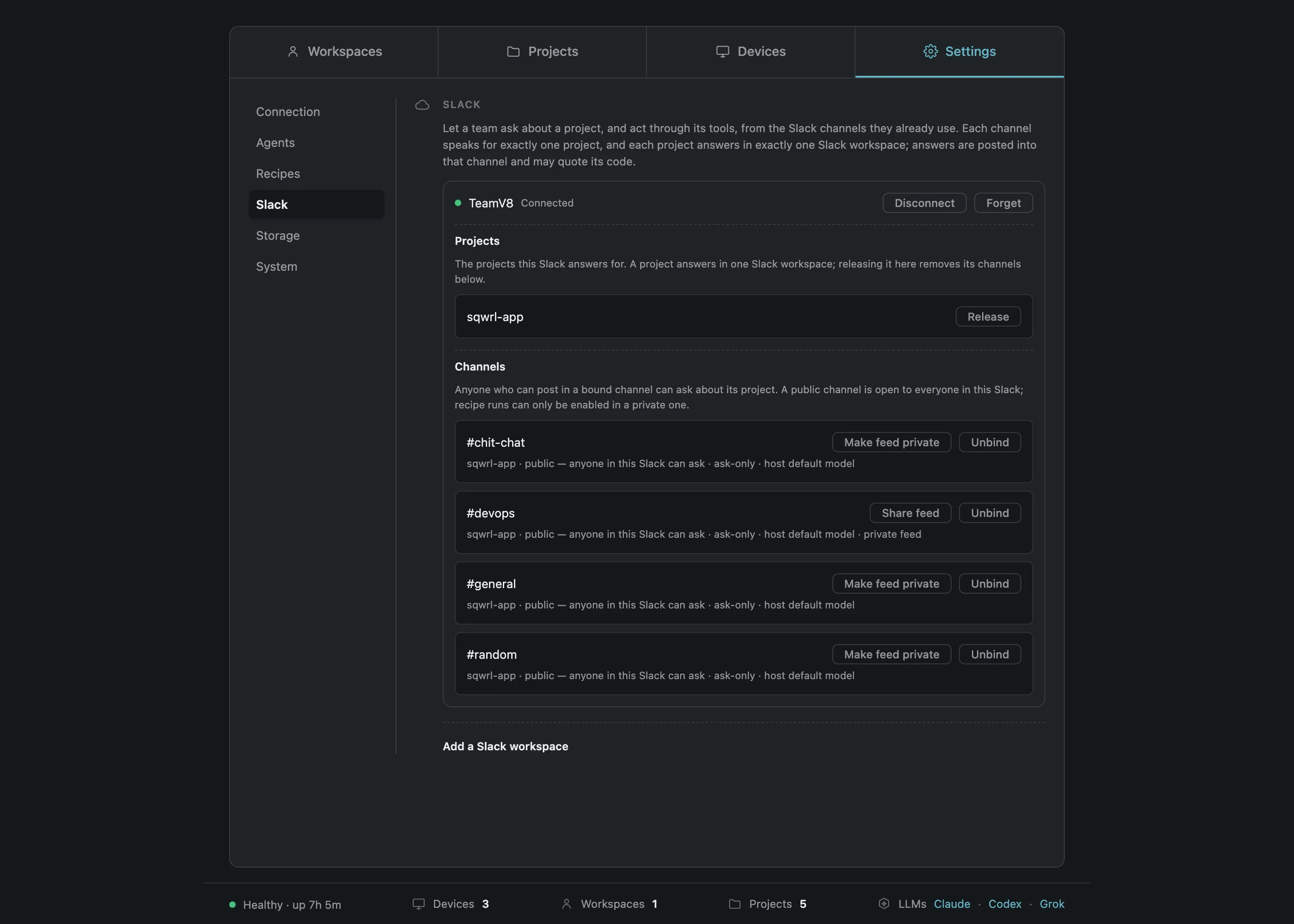
A mention opens an Act-mode inquiry in that project’s checkout. It reads the working tree and leaves the repository exactly as it found it.
A stored recipe, started from a channel by anyone in it.
Three slash commands that answer only to the person who typed them.
/prchd status
project     payments-api
channel     #payments-eng · private
connection  connected
runs        enabled
inquiries   Act mode · pinned model
A built-in MCP server that lets a run report itself into a channel rather than only replying where it was asked.
Every Slack interaction lands as a content-free event beside the chat’s own transcript.
Two teams on one computer, kept apart — and a developer’s own feed kept clear of the team’s traffic.
Runs while you’re elsewhere
Crash triage, the morning brief, the nightly suite: unattended work that used to wait for someone to find time is finished when people arrive. Write a recipe once and fire it four ways — its posture belongs to the recipe, whichever way it starts.
A recipe is a title, a description, a prompt, and the posture it runs under — a record you author in PRCHD, rather than a file anything scans a repository for.
| Mode | Your repository | Tools with effects | Typical use |
|---|---|---|---|
| Plan | Reads only | None attached | Research, proposals, design review |
| Act | Reads only | Yes — file a ticket, post, browse, query | Every Slack question; triage that files a story |
| Work | Writes, runs, commits | Yes | Recipes that produce a branch |
Act leaves your repository exactly as it found it, and still gets things done in your other systems. The prompt itself reaches the agent verbatim, and the skills the agent already discovers in the repository, the repository’s own instructions, and its hooks all apply exactly as they would in a normal session.
Alongside the team’s own recipes, PRCHD ships built-ins that are part of how the product works — naming a workspace, drafting a commit message, drafting a pull request, reviewing one, framing a Slack thread, and reading the work tracker. Their prompt text is editable and overridable per project, resolving project, then computer, then shipped default, one field at a time.
Runs the full test suite on the latest base and writes up what broke, with the change that most likely did it.
Reads a crash against the real code, then files a story through the tracker the agent already reaches.
Reads last week’s merges and writes the leadership summary in plain language, then posts it.
Three examples. Each is a prompt plus a posture that a team writes for itself.
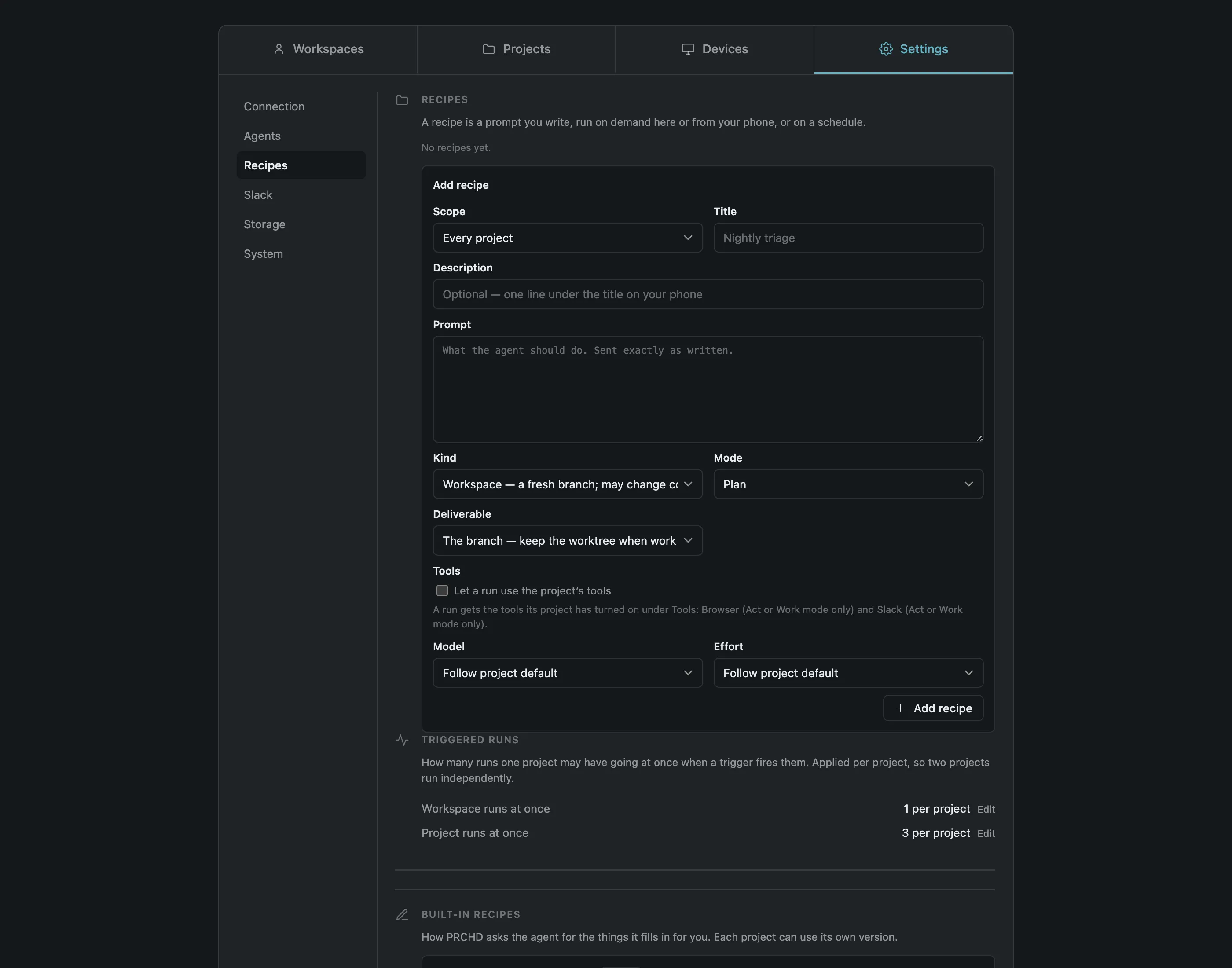
One launcher sits under all four, so a recipe behaves the same whichever one starts it.
| The surface | What starts it | What the caller supplies | The guardrail |
|---|---|---|---|
| On demand | Run now, on the computer or the phone | Nothing, or a line of input | The recipe’s own posture, unchanged |
| From Slack | /prchd run <recipe>: <input> | Input text | A private channel the operator enabled for runs |
| On cron | Five fields in the host’s timezone | Nothing — the prompt reads the fire | A slow run joins the one in flight rather than stacking |
| From a webhook | A delivery your verifier admitted | Up to 24 short variables | Built-in recipes are refused a URL outright |
Put recurring work on a schedule: standard five-field cron in the host’s timezone, per project, at minute granularity.
0 9 * * 1Every Monday at 09:00, in the host’s timezone.
runs: Monday shipped list → posted by the Slack notifier
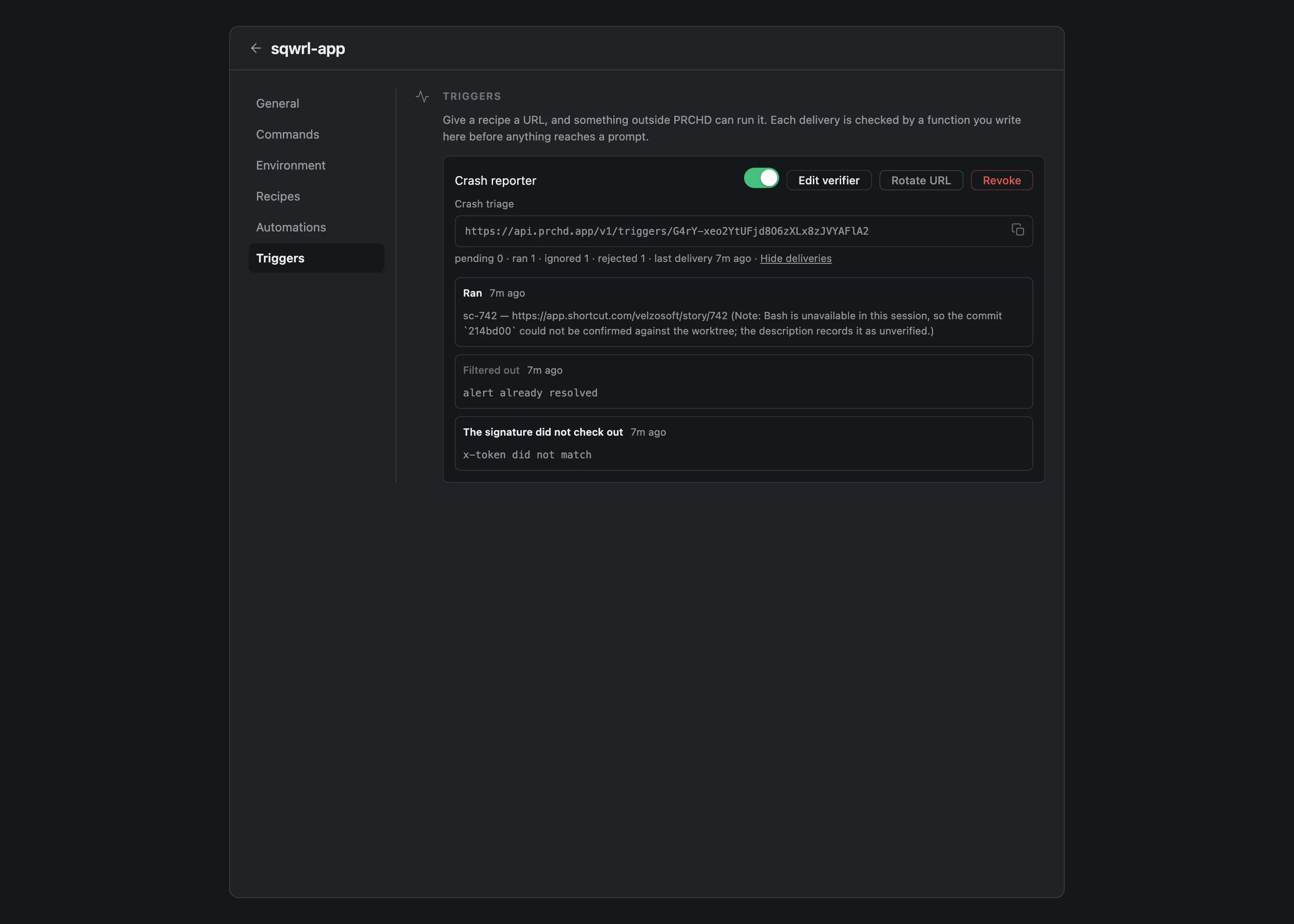
Let the event start the work. A trigger binds one project, one recipe, and one verifier to a URL an external provider can call.
The editor ships starter snippets for common providers — a signature check, a bearer token, a threshold — and they are text you edit rather than a provider registry. A trigger carries no provider id, so an internal tool that posts a webhook is the same amount of work as any well-known one.
The limits an evaluator asks for, in the units they ship in.
Slack
Triggers
Host
The edges we keep
Each limit is a decision with a reason behind it, so each one gets the same weight as a feature.
What PRCHD is, stated as plainly as the feature list above it.
A device token on your own tailnet, or membership of a bound Slack channel, is the whole grant. PRCHD has no accounts, roles, or per-person permissions, so someone joining means nothing to provision.
A workspace is one worktree, one branch, one live session, with no shared buffer or cursor. Slack is where the team asks and starts work; hands-on editing happens on a developer’s own computer.
Repositories are read where they sit, and nothing is uploaded to be indexed. PRCHD hosts no repositories and runs no compute of its own.
That is where the host runs today. Windows, Linux, and Intel builds are not out yet.
Work already running carries on while you’re away. Starting something new needs the computer reachable — the phone keeps no queue to send later.
Dictate with the phone keyboard you already use. PRCHD runs no speech service of its own.
Plan, Act, or Work is picked before the turn runs and holds for the whole turn, in place of a prompt for each tool call.
A close-time conflict keeps the worktree and the branch intact until you resolve it in your own editor.
A dev server opened from PRCHD is reachable over your tailnet, and only there.
Context and token usage are reported. PRCHD doesn’t estimate monetary cost.
PRCHD drives the agent CLIs already signed in on the machine, under your own or your team’s accounts, and resells no model access.
Third-party tools reach the agent through its own MCP configuration; PRCHD has no MCP client of its own. The reach is as wide as your agent’s, and none of it is ours to certify.
The details an operator asks about before binding a channel or pointing a webhook at a trigger.
Installed into your Slack workspace from a published manifest. Socket Mode apps can’t be listed in the Marketplace, so setup is pasting two tokens rather than one click.
The bot’s messages tab is read-only, and only a mention starts a turn.
A mention and one slash command are the entire vocabulary — no buttons, modals, home tab, or message shortcuts to learn.
A thread gets one “Working on it”, then the answer edits itself in. A long run looks quiet while it works.
Recent channel-level mentions are read back when the computer reconnects. A follow-up posted inside a thread while it was offline is not.
It supplies input to a recipe the operator wrote and runs under that recipe’s posture, with no prompt, mode, or target of its own. That is a limit, and it is the point.
In place of a test button, a new trigger’s URL goes live immediately and answers every delivery as ignored until its verifier exists — so you write the verifier against real bytes.
Your own code runs in its own short-lived process with the obvious globals removed, to catch accidents. It is a contract, not a jail for code you didn’t write.
Read the security mechanisms →Check the requirements →Read the FAQ →
Where your code lives
Repositories, worktrees, prompts, transcripts, diffs, command output, attachments, environment values, and the event log stay on the computer you installed PRCHD on — the one that already has your code and your tools. The agent works there, so there is nothing to copy into a hosted environment and nothing uploaded to be indexed.
One small public service handles what a computer with no open port can’t do on its own: it enrolls your computer’s identity, forwards short push notifications, and holds webhook deliveries until your computer collects them. Each delivery is sealed to your computer’s public key the moment it arrives, so the service only ever holds ciphertext, and it is never in the path of your work.
Give it a remote control: install PRCHD there, then pair your phone over your tailnet, bind a Slack channel for the team, or both.