For the team

One person sets it up. Everyone else gets answers.

Today a question about the code waits for the engineer who knows it. Here, one operator sets up a computer the team already owns, and from then on anyone in a bound channel can ask. That computer holds the checkouts, the agent sessions, the tools, and the record of every run.

Driving your own agents from your phone runs on your own computer, with the same app. Read the developer loop →

Set up once

An afternoon, not a migration.

The operator installs a menubar app, points it at repositories already on disk, and connects Slack — all on one computer the team already has.

Follow the team host setup guide →

install the host on a computer that stays awake
  → attach the repositories it may reach
  → connect Slack as your own app, outbound only
  → bind a channel to a project and set its two switches
  → attach the tools on the agent CLI, per project root
  → write the recipes people will reuse
  → put the recurring ones on cron or behind a trigger URL
  → the channel asks; the answer is footed with the commit

01 / The computer

Give it a computer of its own.

Questions arrive all day and crashes arrive at 2 a.m., so the host wants a computer that stays powered, stays signed in, and can be left alone: a shared computer in the office, a spare box, a Mac mini on a shelf. The laptops people write features on stay theirs.

  • Developers keep writing code on their own computers
  • A team host has no phones paired to it, by design
  • macOS 13.0 or later, Apple Silicon

Standing watch

host        the office Mac mini
agent CLI   Claude Code, signed in with the team account
projects    4 attached
slack       connected · 1 Slack workspace
phones      none paired

02 / The projects

Point it at the code people ask about.

Attaching points PRCHD at a local git directory that is already on disk. The host detects the stack and seeds setup, run, and test commands, so a recipe has something to call on the first day.

  • Node, Rust, Go, Flutter and Dart, Python, Ruby, and common monorepo layouts
  • Seeded commands are ordinary commands, and yours to edit
  • Each project stays the ordinary checkout it was — nothing is uploaded or indexed

Detected on attach

project        stack     setup            run              test
payments-api   Ruby      bundle install   bin/rails s      bundle exec rspec
web            Node      npm install      npm run dev      npm test
mobile         Flutter   flutter pub get  flutter run      flutter test
edge           Rust      cargo fetch      cargo run        cargo test

03 / Slack

Connect the Slack your team already uses.

The team installs PRCHD’s published manifest as its own custom Slack app and pastes the two tokens into the dashboard. The connection is Socket Mode — one outbound WebSocket — so nothing on the computer listens, and no callback URL points at it.

The app belongs to your Slack workspace and to your Slack admins. Adding a project to a second Slack workspace is refused by name.

Outbound onlyNo port openedRead the mechanism →

The connection

app         your own, from PRCHD's published manifest
tokens      bot + app-level, pasted once, held on the machine
transport   Socket Mode - one outbound WebSocket
inbound     none - no port, no callback URL, no tunnel
scope       one project answers in one Slack workspace, or none

04 / The bindings

Bind a channel, and its members can ask.

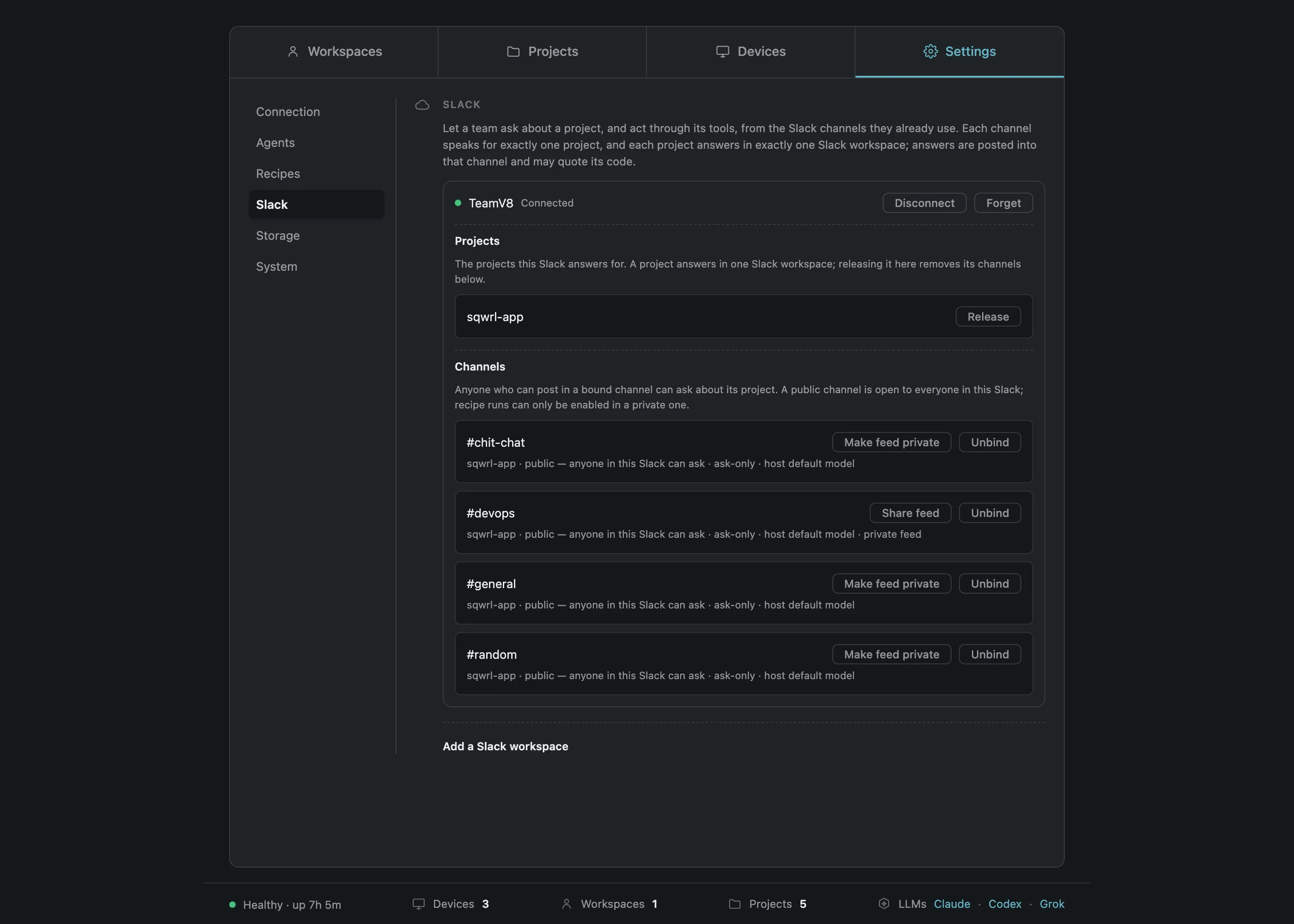
#payments speaks for the payments repository. A channel speaks for exactly one project, and every binding carries two switches the operator sets deliberately.

may this channel run recipes?

Runs require a private channel the operator has enabled for them. A public channel can never be runs-enabled, and an ask-only channel says so rather than failing quietly.

is this channel’s activity visible to paired phones at all?

A binding marked private keeps its activity on the computer entirely. A team host has no paired phones, so it sends no push: results arrive in the thread the work was asked in.

  • Channels shared with another organization are refused
  • Every reconnect re-reads each binding against Slack’s own answer
  • A mention in a channel that is not bound is silent, and recorded

Membership of the channel is the grant, which is why binding is something the operator does on the host itself.

Slack bindings dashboard: each channel, the project it speaks for, and its feed-visibility switch

05 / The tools

Give it the same tools your engineers use.

MCP servers are configured on the agent CLI, per project root, exactly the way that CLI documents. PRCHD has no MCP client of its own: the agent holds the credentials and talks to those services, and PRCHD runs the agent. So the agent on the shared computer reaches Jira, or Shortcut, or ClickUp, the same way it does on a developer’s own computer.

Any MCP server that exists today already works here, from the day your team configures it.

  • Two servers ship with the host — a browser, and Slack itself. Both off; enabled per project
  • A project’s settings introspect what the agent would connect to: servers, status, tool lists
  • Per-project environment values are Keychain-sealed and write-only

What the agent CLI reports

claude · payments-api
  tracker          connected   9 tools
  crash-reporter   connected   4 tools
  warehouse        connected   6 tools
  browser          off         built in
  slack            on          built in

Read from the agent’s own configuration on that computer. PRCHD keeps no copy of it.

06 / The recipes

Write the job once. Decide what starts it.

A recipe is a stored prompt plus the posture it runs under — written once by the operator, run by anyone. The channel supplies the input text; the mode and the target stay the recipe’s. One recipe, four ways to fire it.

  • A slow run never stacks: the next fire joins the one already in flight
  • A window missed while the computer slept is skipped, unless the automation catches up once on start
  • A trigger runs a stored recipe under that recipe’s own posture, and cannot name its own prompt
  • Deleting a recipe is refused by name while an automation or a trigger still points at it

The record

recipe        Repro harness
kind          bug
mode          Work
deliverable   a branch with a failing test
scope         payments-api
model         pinned, high reasoning effort

Four ways to fire it

on demand     from the host dashboard
from Slack    /prchd run Repro harness: PROD-882
on cron       0 9 * * 1-5
from a URL    a trigger the operator bound to this recipe

What happens next

A question, a crash, and a Friday.

Three things that used to wait on a person: a question, a crash at 02:14, and the Friday write-up. Each now ends in the same place — a real agent session, on real code, on the team’s own computer, recorded in a durable event log.

Tuesday, 10:42 · a question in a channel

Someone asks, and the engineers keep coding.

The host opens an Act-mode inquiry in that project’s checkout, reacts to the message, posts a placeholder, and edits it into the answer when the turn settles. Act mode changes nothing on disk, and it can still file a ticket.

  • The question reaches the agent exactly as typed
  • A follow-up in the same thread joins the discussion already in progress
  • The footer names the project, the commit, the branch, and the mode
#supportSlack
  1. Dan Whitfield10:42

    @PRCHD a customer says the export email never arrives when their report is large. Is that a limit we set, or the mail provider?

    eyes · PRCHD

  2. PRCHDAPP10:42

    Working on it…

  3. PRCHDAPP10:44

    Ours. An export over 40 MB is dropped from the email path and delivered as a signed download link instead. The link email is sent by the same worker, so a failure there looks identical to a missing export.

    The threshold is a per-project environment value, read at launch — not a provider setting. It is applied in workers/export_mailer.rb.
Thursday, 02:14 · a crash

The crash is triaged while everyone sleeps.

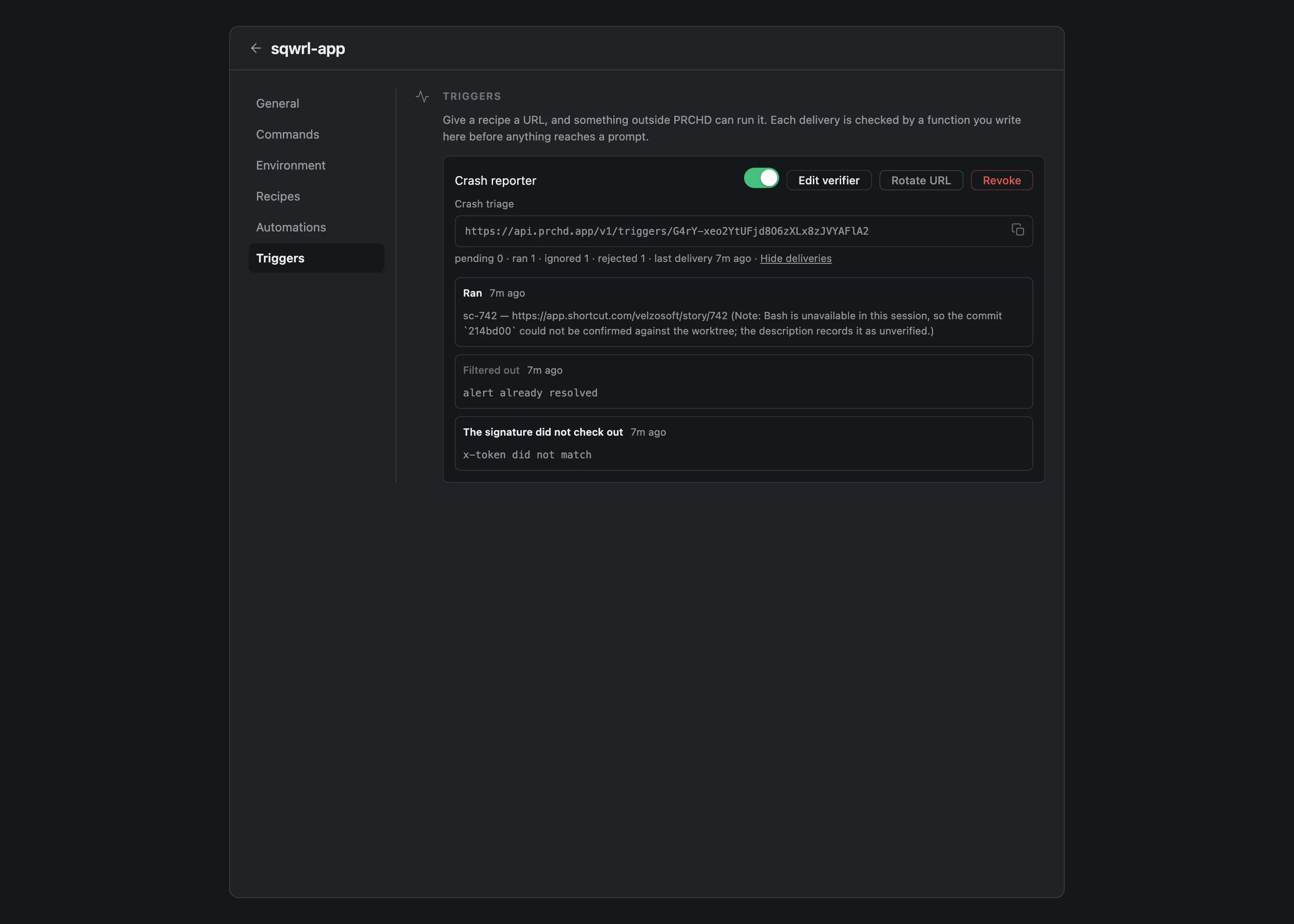
The crash reporter posts to a trigger URL on the public PRCHD service, which seals the delivery to the computer’s public key on arrival and stores only ciphertext. The host collects it on its next outbound poll, hands the exact transmitted bytes to the verifier the operator wrote, and on authentic and worth a run starts the recipe bound to that trigger.

By the time anyone looks, the triage recipe your team wrote has filed a story through your own tracker — with the failing frame, the file it lands in, and the commit the code was read at.

Trigger deliveries: ran, ignored, and rejected — each with its reason in plain words
  1. 01The eventA crash, an alert, a red build, a ticket movingtheir system
  2. 02Sealed on arrivalECIES over P-256; ciphertext at restPRCHD service
  3. 03Collected outboundThe host polls for it — triggers need no inbound portyour computer
  4. 04Your verifierFresh process, 2 s, the exact transmitted bytesyour computer
  5. 05The recipeA stored prompt under its own posture, with your variablesyour computer
  6. 06The deliverableA story filed, a branch left, a summary postedyour computer

Friday, 16:00 · a report

The weekly write-up is posted before the weekend.

A scheduled automation runs a recipe on a standard five-field cron line, in the host’s timezone, at minute granularity, per project. Every fire records a durable start, end, outcome, and summary — and the summary outlives the worktree, so a discarded run is still a readable record.

  • The prompt interpolates the last successful run, so a report says since last time rather than guessing at a window
  • An absent value reads as the word never, never as a blank
  • Run now uses the same path for testing, and does not shift the schedule
0 16 * * 5

At 16:00 every Friday, in the host’s timezone.

Weekly shipped — posted into #eng by the Slack notifier

What everyone else does

They ask in a Slack channel they are already in, with the Slack account they already have. For most of the team, that is the whole product.

Where your code lives

The computer you own is the computer that runs.

Repositories, worktrees, prompts, transcripts, diffs, command output, attachments, environment values, and the event log stay on the computer you installed PRCHD on — the one that already has your code and your tools. The agent works there, so there is nothing to copy into a hosted environment and nothing uploaded to be indexed.

One small public service handles what a computer with no open port can’t do on its own: it enrolls your computer’s identity, forwards short push notifications, and holds webhook deliveries until your computer collects them. Each delivery is sealed to your computer’s public key the moment it arrives, so the service only ever holds ciphertext, and it is never in the path of your work.

Your checkout stays where it isOutbound only — nothing listensRead the mechanisms →

Send the next question to the code.

The setup guide walks the same path in nine steps, with the exact clicks, tokens, and checks in order.